
I had the privilege of creating and running an online digital storytelling course for the African Storybook project. Here are some suggestions for illustrating stories that I gleaned from the course participants.
1. Hand drawn pictures
Hand drawn with kokis or pencil crayons and scanned into the computer.
Example: A noise in the night

2. Use cutouts
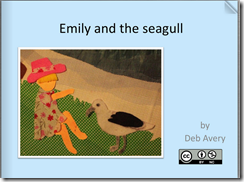
Create a background in some way. Then cut out figures and objects and place them on the background. Take a photo. Then for the next page move them around again and take another photo.
Example: Emily and the Seagull
3. Take photos
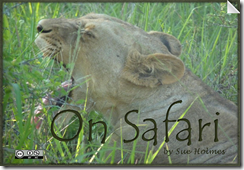
Take photos of different scenes. (Remember that if there are people involved in a photo you need to get permission from the people in the photo if you want to use it on the web).
Example 1: Andiswa Soccer Star

Example 2: On Safari
4. Use collages
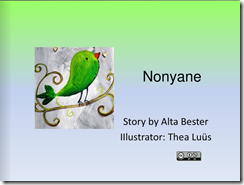
Use a mix of drawing painting and odds and ends stuck on and a picture taken.
Example 1: Nonyane

5. Lego people
Use lego picture templates, cut them out and past them on a piece of paper. use a scanner to upload them. Example: http://mattbgomez.com/lego-family-labeling/

6. Line drawings clipart
If you type into Google for example 'horses clip art line drawings' you'll be taken to a page like this http://goo.gl/IKqrX8. Print what you want and then cut it out and place it on a sheet of paper and draw around it. Colour it in.
Example: Khotso goes to the zoo

7. Public domain clipart
This is clipart that is free to use. I have given some suggestions in a blogpost
‘Finding royalty free images on the Internet’
Example: What on earth are you doing?

8. Use a free computer application
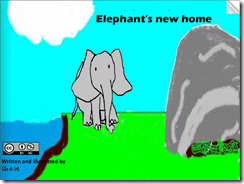
Use a free computer program like PAINT or PAINT.NET or something else to draw pictures and colour them in.
Example: Elephant’s new home

9. Ask friends, relatives or children to draw for you.
Why not ask others to do the pictures for you?
Example: The adventures of Meerkat and friends

10. Paint a picture
Example: A Value Painting Exercise
11. Use large almost abstract like cutouts
Example: Art Ideas for Inspiration: Illustrating Plot of a Story
12. Use cartoon-like figures
I would suggest uploading to a programme like PAINT or a similar application to colour them
Example: How to make illustrations even if you can’t draw

13 Draw childlike pictures
Example: Draw your story – the illustrated journal

14 Ask one of the children in your class to draw for you
Example: Sipho signs away

15. Use stuffed toys
Use stuffed toys, move them around and take photos.
Example: The mystery of the vanishing books

16. Use a computer application from school
Example: Monsters under my bed


1. Hand drawn pictures
Hand drawn with kokis or pencil crayons and scanned into the computer.
Example: A noise in the night

2. Use cutouts
Create a background in some way. Then cut out figures and objects and place them on the background. Take a photo. Then for the next page move them around again and take another photo.
Example: Emily and the Seagull

3. Take photos
Take photos of different scenes. (Remember that if there are people involved in a photo you need to get permission from the people in the photo if you want to use it on the web).
Example 1: Andiswa Soccer Star

Example 2: On Safari

4. Use collages
Use a mix of drawing painting and odds and ends stuck on and a picture taken.
Example 1: Nonyane

Example 2: Lion collage
5. Lego people
Use lego picture templates, cut them out and past them on a piece of paper. use a scanner to upload them. Example: http://mattbgomez.com/lego-family-labeling/

6. Line drawings clipart
If you type into Google for example 'horses clip art line drawings' you'll be taken to a page like this http://goo.gl/IKqrX8. Print what you want and then cut it out and place it on a sheet of paper and draw around it. Colour it in.
Example: Khotso goes to the zoo

7. Public domain clipart
This is clipart that is free to use. I have given some suggestions in a blogpost
‘Finding royalty free images on the Internet’
Example: What on earth are you doing?

8. Use a free computer application
Use a free computer program like PAINT or PAINT.NET or something else to draw pictures and colour them in.
Example: Elephant’s new home

There's a very simple application called Queeky.com. You just open it and start drawing. Then you save it and add the picture to your presentation template
http://www.queeky.com/app9. Ask friends, relatives or children to draw for you.
Why not ask others to do the pictures for you?
Example: The adventures of Meerkat and friends

10. Paint a picture
Example: A Value Painting Exercise
11. Use large almost abstract like cutouts
Example: Art Ideas for Inspiration: Illustrating Plot of a Story

12. Use cartoon-like figures
I would suggest uploading to a programme like PAINT or a similar application to colour them
Example: How to make illustrations even if you can’t draw

13 Draw childlike pictures
Example: Draw your story – the illustrated journal

14 Ask one of the children in your class to draw for you
Example: Sipho signs away

15. Use stuffed toys
Use stuffed toys, move them around and take photos.
Example: The mystery of the vanishing books

16. Use a computer application from school
Example: Monsters under my bed

17. Foliage art
18. Tracing pictures
You can trace pictures and draw/colour them in your own way. http://www.ehow.com/video_4955159_art-ideas-inspiration-tracing-layering.html. Here is another example: http://www.wikihow.com/Illustrate-a-Children's-Book
19. Use black and white pencil drawings
You can even use pencil drawings. Here is a great collection of free p[encil drawings http://www.stumbleupon.com/su/8fZBPc/etc.usf.edu/clipart/
20. If you are an artist - hooray!
Here are some ideas for those who are already artists and can illustrate their own books.
Something you cannot do
One thing tat you cannot do is simply use any clipart you find and give a link to it. The clipart must have a Creative Commons license attached for you to be able to do that
Enjoy your illustrating!


