My Grade 6 and Grade 7 computer class learners were hard at work, a while back, writing and publishing their own creative stories using Canva and Book Creator together.
Using Canva for planning, drafting, and designing their pages, and Book Creator for publishing their final books, the learners explored what it means to be real authors. They experimented with characters, settings, plot twists, illustrations, and digital layout design.
Each learner produced an interesting story, full of imagination.
You are invited to view their completed books in their online Book Creator library.
When I first mentioned to my Intermediate Phase classes that our new A3 Microsoft license provides every student with access to Minecraft Education Edition, there was such excitement in the air!
What is MinecraftEdu?
Minecraft education edition is a game- based learning platform that can be used in all subjects to encourage the 21st skills of creativity collaboration, critical thinking and communication. Students really enjoy using this program when it is combined with the curriculum.
Getting started with Minecraft
Teachers often feel – how can I use this platform and how do I get started? I felt like that and was encouraged by the YouTube video about Katja Borregaard, an educator at Skt Josefs Skole in Roskilde, Denmark. She claimed one doesn’t have to be a gamer or an expert in Minecraft: Education Edition in order to get started. She took the plunge and got started for the sake of her learners, and she has never looked back.
I started with Grade 7 and Grade 6 in Coding lessons. I was fortunate in that my students are already very knowledgeable about Minecraft – so they were able to teach me! We started with the Hour of Code Minecraft Education Edition activities. found on the Minecraft platform. In these activities, the he students have to solve quests using coding. Here are some of our photos.
This is game-based learning! We are all learning such a lot! As we go along I will post more posts showing how we are using MinecraftEdu in our lessons.
This term the Grade 6s and 7s have been creating websites to use as digital portfolios. They used Google Sites for their websites and made their Google Site headers using Canva. Canva is a wonderful graphics online application. As a teacher I could apply to get Canva free for myself and all my students - my application was successful, so all the classes use Canva. The students came up with the loveliest of designs.
Learner examples
How did we go about making the website headers?
Once again I found a relevant Youtube video to use to teach myself the steps. Here is an example of one of the videos that I followed for guidance - 'How to Create Custom Banner and Buttons for Google Sites' from Vestal's 21st Century Classroom Channel: https://bit.ly/3x5CkkV.
The Grade 6s and 7s have been creating websites to use as digital portfolios throughout the year. They used Google Sites for this. Of course, Canva, my favourite graphics application, helped the students create stunning sites.
How to create website buttons using Canva
They made superb headings for their websites using Canva (see previous post) and they also created attractive buttons for each page using Canva. They used the following headings (we brainstormed the ideas for these headings based on last years ICT work): - About me - My blog - My stories - My other writing - My projects - My videos and graphics - My coding examples
They have started uploading this term's work to their digital portfolios, and so far have uploaded an 'About me video' and an 'I am' poem to their About Me page.
When I learn to do something, I usually find a relevant YouTube video or two, and then I create a relevant PowerPoint to guide my lessons with the learners. (You can see that I use Google Workplace and Microsoft interchangeably!) I convert this PowerPoint to Google Slides and add it to my Google Classroom lesson so that it is always available for the learners to look at. (I use Google Classroom for every lesson). This procedure works really well for me.
Here is an example of one of the videos that I followed for guidance in making buttons - 'How to Create Custom Banner and Buttons for Google Sites' from Vestal's 21st Century Classroom Channel: https://bit.ly/3x5CkkV.
Although we do Coding lessons at school every two week with our Grades 1 - 7 classes, we always love to end the term with an Hour of Code, and obtain a certificate. We were delighted to find that Dance Party was available as an Hour of Code session.
What is the Hour of Code?
The Hour of Code is a one-hour tutorial designed for all ages in over 45 languages. It is run in 180 countries from 7 - 12 December - although one can do it any time, like we do. There are loads of different options to choose from based on your students' age https://hourofcode.com/za/learnThe Hour of Code is a global movement to introduce people of all ages to computer programming in a fun way, and it certainly achieves that. The students are awarded a certificate once they have completed their Hour of Code. Our students love it.
Here is a photo of the Grade 4s who loved using Dance Party for their Hour of Code at the end of this term.
At our school we use avatars as a replica of the student creating them. The students use online names when they create online sites such as a blog or sites, and they never put photos of themselves on their own sites - hence an avatar. One can use avatars for various purposes such as uploading a profile picture to ta Google Drive profile, a Google classroom profile, and a blog or website profile etc.
Why use www.cartoonify.de?
The learners love creating avatars. I rather like this site, cartoonify.de, as no login or registering is required and the students can download their avatars in three sizes to their downloads folder. We always use the smallest size, 250 X 250 pixels.
Examples of the created avatars
Here are a few examples of the avatars made by the learners:
Blogging is an online, digital form of writing that has always appealed to me as a teacher. I see blogging as an exciting way to enable my students to express their thoughts and share them with the world while learning the important lessons of online safety at the same time. We use blogs as digital portfolios so that the learners can show their families what they have created. We use Blogger because the teacher can have control over the blogs.
The amount of learning that can happen through blogging is very beneficial. The students not only learn about online safety, but also about formatting, editing, and how to work with images and videos as they work on their blogs. best is they are creating!
The classes were able to create lovely headers in Canva and they added their avatars and poems to their blogs as well.
The Grade 2s learned about using Google Sheets this term. Google Sheets is Google's version of Excel. I thought that I would use the story of the Gingerbread Man to teach the Grade2s about using Google Sheets. (I can't remember now where I originally got the actual Gingerbread house template from - but I love using it!)
1. First they listened to and read the story of the Gingerbread House on YouTube.
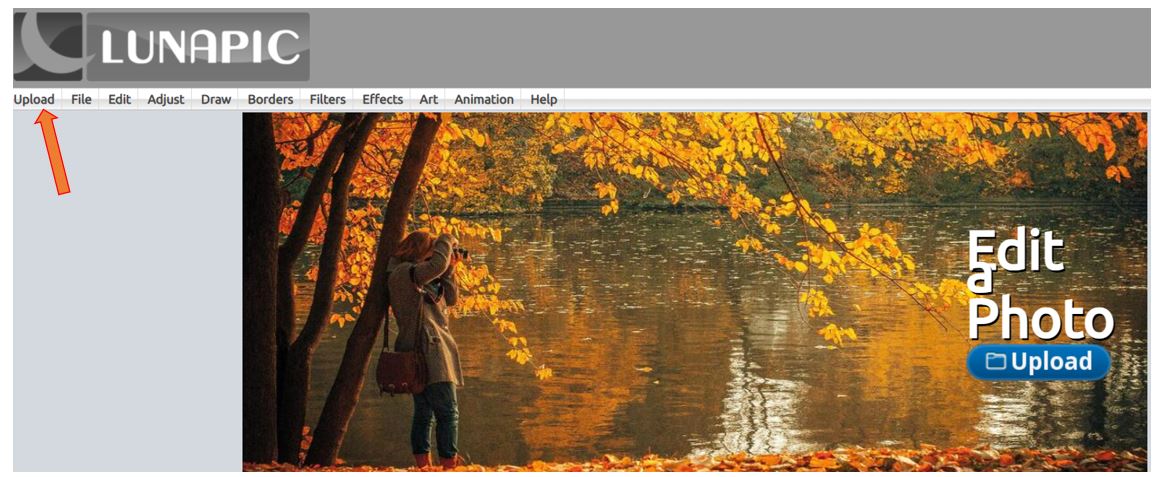
Lunapic, (https://www2.lunapic.com/editor/), is a free online photo editor that can blur a face once you upload a photo to the site. I use this site constantly when I want to blur faces from my classes in a photo. I am writing this post to remind myself how to do this!
1. Go to https://www2.lunapic.com/editor/) and select ‘Upload'. You can also select 'Upload' directly under the title on the image.
2. Upload your photo. Then go to DRAW / BLUR. Select the area you want to blur and draw a box over the face. Then click on 'APPLY BLUR'. The face is blotted out.
3. Download your photo onto your computer and use as desired. Under the privacy policy, the site mentions that the images are automatically deleted from Lunipic after editing.
The Grade 4s were learning how to use Canva from scratch, so we decided that each one would create a quiz about a different group of animals. (Canva has a lovely selection of presentation templates. However, we decided to use a blank presentation for this lesson so that we could learn more about Canva.) We thought decided that one slide would say 'What is this?' and the next slide would have the answer.
In doing this we learned about text size and effects, text placement, how to set an image as a background, and many more aspects of Canva.
Here are some examples of the resulting presentations:
In the image below we see the three quizzes shown above, on the topics of Insects, Farm Animals and Wild Animals, being displayed on the learners' Chromebooks. In the lesson, after the quizzes were completed, the kearners each presented theirs to the rest of the class as a general knowledge quiz.
Today was World Read Aloud Day and we celebrated this in my Grade 2 – 7 ICT classes at school with Nali’bali. We downloaded Nal'ibali's #WRAD story, A Party in the Park, on our Chromebooks, and we all read together in unison. Then we discussed the story in the form of an oral book review. The children loved it.
Nal'ibali aimed to get 1 million families to pledge their family to read aloud the Nal'ibali special story on World Read Aloud Day 2022 - 2 February. If only parents could realise and embrace the importance of regular reading in brain development – if only they could see the big picture about this. They would then definitely make reading aloud to children a daily priority!
The importance of reading aloud to children
Here are some useful quotes from articles and studies about the importance of reading aloud to children:
“Reading regularly with young children stimulates optimal patterns of brain development, which helps build strong pathways in the brain and in turn builds language, literacy, and social-emotional skills that can have life-long health benefits.” - from '‘Reading to young children develops their brains.' https://bit.ly/3KYQnxr
"A child care provider reads to a toddler. And in a matter of seconds, thousands of cells in these children’s growing brains respond. Some brain cells are ‘turned on,’ triggered by this particular experience. Many existing connections among brain cells are strengthened. At the same time, new brain cells are formed, adding a bit more definition and complexity to the intricate circuitry that will remain largely in place for the rest of these children’s lives.
As we come out of the Pandemic, let's prioritise reading aloud to children in order to develop their reading skills. The long-term benefits are immeasurable.
Today was our first computer lesson of the year and the Grade 4-7s played Chromebook Bingo as a fun way to review our knowledge about navigating our Chromebooks. I can't recall where I got this lesson from - an online conference I think, but it is wonderful.
Oaky and the Virus: written by Athol Williams and illustrated by Tarryn Locke. Published by Theart Press
I am a primary school teacher – a technology integration
specialist, and I used a Grade 1, a Grade 2, and a Grade 3 class to help me write this review.
We downloaded the book from the Oaky website to our Chromebooks, and used it as a class read-aloud in the three classes. We all read aloud at the same time, in unison. Each class loved the experience because the book was very relevant to the COVID pandemic. The three classes helped me write parts of this book review.
Oaky and the Virus is an educational and fun story about two acorns, Oaky and Oaket. The two acorns learn how to avoid a virus when it comes to their town. The book is the first in the OAKY series of 7 books that follow the adventures of OAKY, an acorn who grows into a big oak tree.
In Oaky and the Virus, Oaky and his sister Oaket hear about a dangerous and tiny virus that has come to town. It could make people very sick. That means the virus could also make them, Oaky and Oaket, very sick if they caught it. The two acorns think of ways that they can protect themselves from the virus and also keep themselves feeling positive and hopeful. Oaky wants to help his anxious sister, Oaket, feel safe. He teaches her a song about how she could protect herself from the virus so that she will feel comforted when she sings it.
The song is available to listen to on YouTube.
What did we like
about the book?
All three classes liked the book because it is about the Covid19 pandemic, and children everywhere are worried about the pandemic. The book gives good ideas for keeping oneself safe and positive. The pages are brightly illustrated and written in a large, clear font, which makes reading a pleasure for Foundation Phase learners.
The common favourite part of the story was when Oaky thinks of ways of protecting himself and his sister from the virus. The classes liked Oaky, as a character, because he thought of ways to help keep him and his sister safe, and he didn’t give into fear. He was kind to Oaket. Some children said they feel a bit like Oaket at times, so they liked that way she felt happier when she knew how to protect herself.
Do we think the book could be improved?
All three classes felt the writer should have created the song to a well-known tune so that they could sing-a-long. They tried fitting the words to 'The wheels on the bus' which added another fun aspect to the lesson. The Grade 3s also felt that the book didn’t have enough excitement for them. They suggested that the writer should have added some more relevant scenarios to make the story more interesting, such as: - hearing about a friend whose parent was very ill from the virus - maybe one of their own relatives could have caught the virus but fortunately didn’t have to go to hospital. As a result Oaky and Oaket had to be careful to keep away from the relative.
Would we recommend the book to a friend?
Everyone said yes to this. They let that the book gives children hope in the midst of a frightening pandemic. The Grade 1s and 2s gave the book five stars! The Grade 3s gave the book four stars!
An important point to mention is that at the end of the book there is quiz. My three classes had clearly absorbed the story content as they were able to answer all the questions in the quiz.
This is a lovely book. It is available to purchase or as a free download from www.oaky.com. The publishers recommend the book for Grade 1 - 4 learners.
Although we do Coding lessons at school every week with our Grades 1 - 7 classes, we always participate in the Hour of Code.
What is the Hour of Code?
The Hour of Code is a one-hour tutorial designed for all ages in over 45 languages. It is run in 180 countries from 7 - 12 December - although one can do it any time. We always choose November at our school. There are loads of different options based on your students' age etc on https://code.org/learn. The Hour of Code is a global movement to introduce people of all ages to computer programming in a fun way, and it certainly achieves that. Our students love it.
For this lesson I wanted the Grade Threes to research an endangered animal, and to try and rephrase what they read in their own words. This is a task one needs to start as early as possible at school so that students don't get into the habit of plagiarising by copy and pasting.
How did we go about the lesson?
1. After finding out what the students already knew about endangered animals we watched a video and answered questions about them. The video was the engaging, short video entitled ‘Endangered animals’ by the SciShow Kids: https://bit.ly/3Ed7hUU.
2. The class was then given a selection of animals to choose from - gorilla, leopard, rhino, sea turtle, giant panda, tiger, or blue whale, - and they found out more about the relevant animal using the search engine Kiddle: https://kids.kiddle.co/.
3. After reading about their selected animal using the Kiddle browser, the students opened their template downloaded from Oakdome.com entitled ‘Animal Research Paperless Graphic Organizer’ https://bit.ly/31aajdZ . They then filled in their answers as far as possible in their own words by researching the key words in the template.
4. Finally they turned in their work so that I could take a closer look at it. They did well I thought,
Here are some examples of the finished products
The examples are by Kaleb,Carol, Elia and Lily. (The students always use their online names when they produce work in ICT)
Post settings
Labels
Grade 3,research skills,
No matching suggestions
Published on
11/7/21 8:36 PM
Permalink
Location
Options
Post: EditPost published
The Grade 2s recently created presentations about South
Africa using Google Slides. Today I wanted to see if they could remember seven
of the national symbols and present them neatly, each with an image, as a poster
in Google Slides.
Skills focus
copy and paste
search images
find a suitable image and paste it into Google Slides
create a light-coloured, abstract background
resize images
Examples of the finished products
The examples below are from Julian, Kayla and Kaleb (the students always use their online names for anything that goes online in ICT).


.png)


.png)


.jpg)



.png)


